A paying fan reports that a download does not open. Before asking them to subscribe again or changing your sharing settings, find the screen where the journey stops. A locked Patreon post, a failed membership check and a storage permission error need different fixes.
Identify the screen that blocks the download
Scroll the table sideways to see all columns.
| What the fan sees | Check here | First action |
|---|---|---|
| Locked Patreon post | Patreon | Confirm the account, tier and payment status. |
| Patreon sign-in or consent screen | Fan’s browser | Complete sign-in with the membership account. |
| TierKey does not redirect | TierKey access history | Read the failure details before changing permissions. |
| Drive or MEGA opens, but the file does not | Storage service | Check the destination and its sharing settings. |
Check the creator’s link settings
- Find the exact TierKey link the fan used. Check that it is active and points to the intended release.
- Compare its allowed tiers with the benefit you promised. A higher payment alone is not a reason to add an unrelated tier.
- If using Pro routing, inspect the destinations and priority for that fan’s tiers. Open the selected destination yourself to check for a moved or deleted file.
- Test storage permissions with a consenting eligible fan. Your storage-owner session may open a file that the fan cannot open.
Use access history to narrow down the failure
Expand the failed entry’s details and compare its time with the fan’s attempt. A sign-in that was not completed, a tier mismatch and a temporary verification error are different situations. A failed entry does not by itself prove that the visitor is a non-member.
A successful redirect means TierKey sent the visitor to the destination. It does not confirm a completed download. If the file still fails there, continue investigating the storage service.
These screenshots use the English interface. Match each number to its explanation. Select an image to enlarge it. Names, URLs and member records are examples.
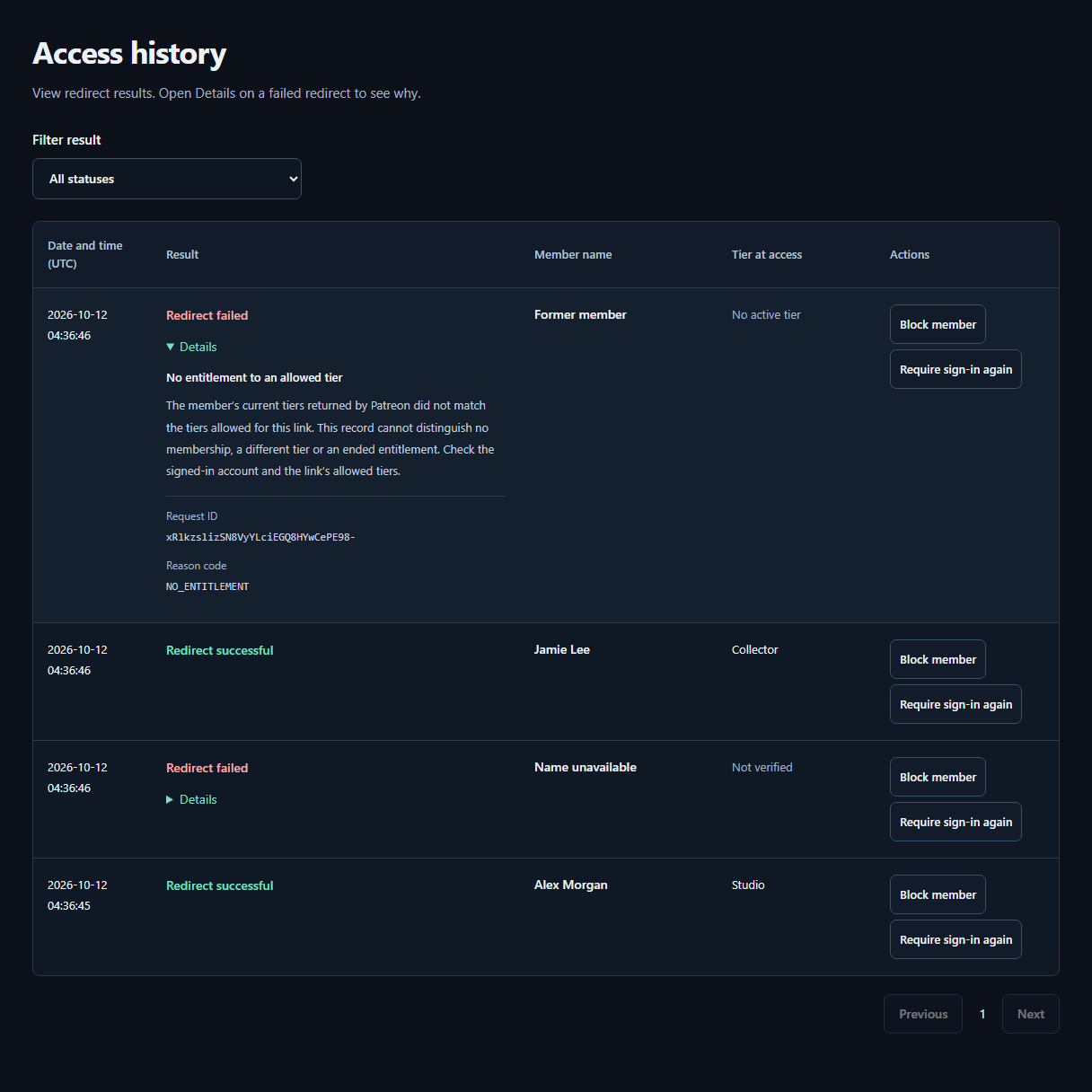
- ResultCheck whether the redirect succeeded or failed. The tier recorded at access appears beside the member’s Patreon display name.
- DetailsOpen Details on a failed row for the reason and next steps. A failure alone does not mean the visitor is not a member.
Ask for enough information to reproduce the problem
Ask the fan for the attempt time and time zone, browser or in-app browser, release name, and exact error text. A cropped screenshot can help. Ask them to hide payment details and private URLs; never request their password or a sign-in code.
Let them retry the same TierKey link in a regular browser using the intended Patreon account. If they are waiting for your reply, acknowledge the problem without labelling them ineligible or asking for another payment.
Retest the complete route after a fix
- Change the specific incorrect setting, then ask the same eligible fan to retry from the published TierKey link.
- Confirm both the redirect and the actual file opening. Also check that an account outside the allowed tiers is not redirected.
- If Patreon verification is temporarily unavailable, retry later or contact support with the error text. Do not make the destination public to work around an unverified diagnosis.