A preview should help someone decide whether to join without giving away the paid deliverable or its direct download address. Prepare the public material separately from the reward. Then check the actual published view as a non-member, rather than relying only on how the post looks in the creator editor.
List the parts that may be public
Patreon’s body paywall and header-media settings are separate. Review both, including preview and thumbnail options available to your account. Account type and post format can affect which controls appear.
Scroll the table sideways to see all columns.
| Surface | Suitable public material | Keep out |
|---|---|---|
| Post title and preview text | A release name and a plain description of the reward. | Private URLs, passwords and member details. |
| Body above the paywall | A short introduction and a deliberately public preview. | The complete paid work or a direct storage link. |
| Header and thumbnail | A separate cover or sample you intend to make public. | A full-resolution reward chosen by mistake. |
| An external download announcement | The membership-check entry link and eligible tiers. | The destination URL pasted alongside that entry link. |
Make a separate preview file
- Choose what the public sample should show: a cover, a limited excerpt or selected detail. Decide this before exporting.
- Export a separate preview from a copy of the project. Open the exported file itself and check its content, dimensions and filename; renaming a full reward to ‘preview’ changes nothing inside it.
- Inspect screenshots for open folder addresses, browser tabs, personal messages and other unintended details. Remove those from the preview copy before publishing.
- Keep the preview and reward in distinct folders or clearly named files so the next upload does not select the wrong one. Keep the original master private.
Keep the raw destination out of the preview
Create a TierKey link for the reward destination and choose the allowed Patreon tiers. Publish that entry link where you intend fans to start. Do not also put the raw MEGA or Drive address into preview text, an image caption or a public reply, because it creates another route around the entry check.
For example: ‘Download through this link: [TierKey link]. Use the Patreon account with access to this tier.’ This instruction can be public if that is your chosen distribution model; opening the TierKey link still requires its membership check. It does not make a public file preview private.
These screenshots use the English interface. Match each number to its explanation. Select an image to enlarge it. Names, URLs and member records are examples.
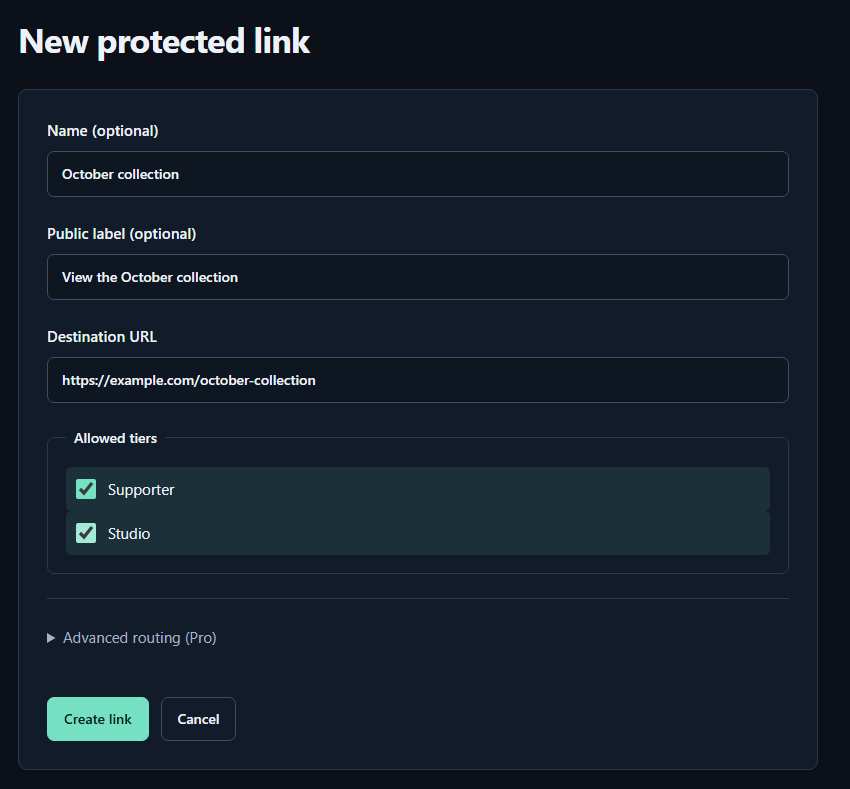
- Name (optional)A name for you. Fans cannot see it.
- Public label (optional)A name shown to fans. Both name fields may be left empty.
- Destination URLPaste the complete sharing URL for your work. The example.com address in the image is only an example.
- Allowed tiersTick every tier that may view the work. Select higher tiers yourself too.
- Create linkPress to save. You can leave the Pro routing settings closed for your first link.
Review the post in three audience states
- Open Patreon’s post preview, then check the published page in a signed-out browser. Record what the title, preview, cover and visible body actually reveal.
- Where practical, check with a free member or an account outside the eligible tier. Use a separate browser session so the creator’s privileges do not hide the difference.
- Ask a consenting eligible member to open the post and download route. Confirm that the public sample is not the only file available and that the intended paid reward opens.
Follow Patreon’s public-preview rules for your account category, including Adult/18+ restrictions. A paywall or age setting does not make every preview suitable for public display.
If a preview already exposed a reward
Replace the accidentally public media and remove exposed addresses from the post and replies you control. If a direct storage link escaped, revoke or change its share at the storage service before publishing a replacement entry link.
Keep a record of what was public and when. Editing the post cannot recall screenshots, saved files or independently uploaded copies. Use the separate removal workflow for those copies, and repeat the audience check after changing the preview.