A private Discord channel can keep a download announcement away from the public. It does not make a copied MEGA or Google Drive URL check Patreon membership. Keep the channel restriction, then decide how the external link should behave when it is opened outside Discord.
Separate channel access from file access
Scroll the table sideways to see all columns.
| Part | What controls access | What a copied link changes |
|---|---|---|
| Private Discord channel | Discord roles and channel permissions | A copied external URL can be opened without reading the channel. |
| MEGA or Drive destination | The storage service’s sharing settings | If open to link holders, it may open outside Discord. |
| TierKey link | Patreon membership and allowed tiers | Opening the copied TierKey link still requires its membership check. |
| Saved file | The recipient’s local copy | Removing a role or link cannot recall that copy. |
Keep Discord’s membership controls in place
Patreon’s Discord integration assigns roles linked to membership tiers. Use Patreon’s official setup guide to configure that integration, and test your private channel with a non-admin account.
TierKey does not assign Discord roles, inspect server membership or replace that integration. A role problem and a failed external download should be investigated separately. Avoid making the channel public as a workaround for one fan’s access issue.
Post the membership-check link in your download message
- Prepare a storage destination containing the intended files. If a direct destination has already leaked, replace or revoke the exposed share before relying on a new entry link.
- Create a TierKey link to that destination and select the eligible Patreon tiers. Check the destination and tiers before copying the link.
- Post the TierKey link instead of the raw storage URL. Explain that fans must use the Patreon account holding the membership, even when they are already signed in to Discord.
- Review pinned messages, older announcements and bots’ automatic replies for raw destination URLs that still bypass the new entry link.
These screenshots use the English interface. Match each number to its explanation. Select an image to enlarge it. Names, URLs and member records are examples.
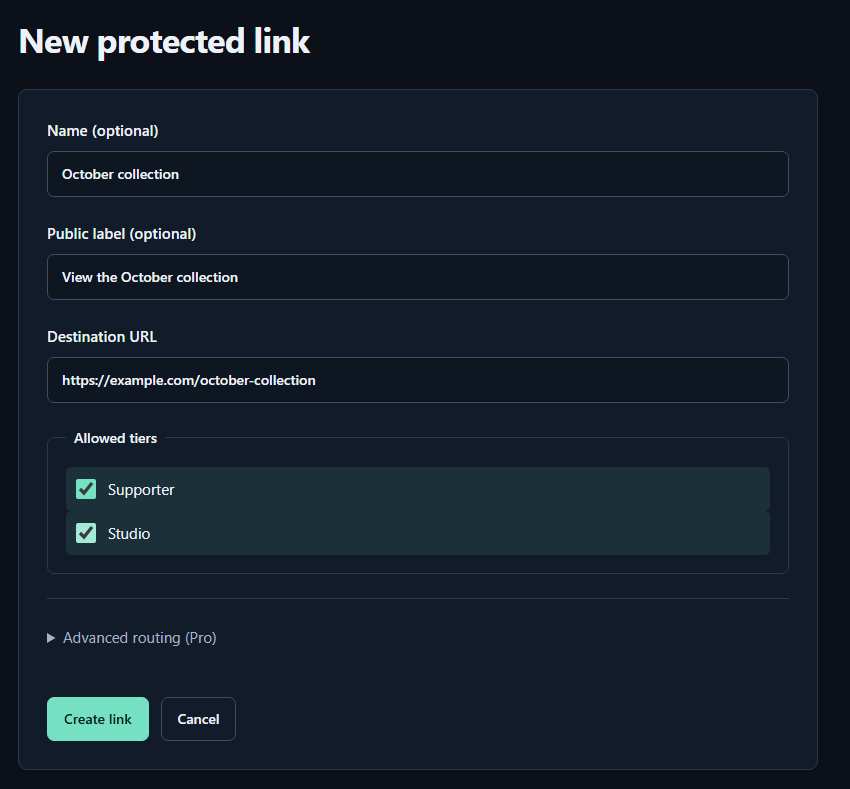
- Name (optional)A name for you. Fans cannot see it.
- Public label (optional)A name shown to fans. Both name fields may be left empty.
- Destination URLPaste the complete sharing URL for your work. The example.com address in the image is only an example.
- Allowed tiersTick every tier that may view the work. Select higher tiers yourself too.
- Create linkPress to save. You can leave the Pro routing settings closed for your first link.
Give members a short instruction they can follow
Example: ‘Download this release: [TierKey link]. Open it in your browser and sign in to Patreon with the account that has access to this tier. If it does not open, send us the error text and the time you tried. Do not send your password or verification code.’
Keep the release name and relevant tiers beside the link. Do not describe Discord sign-in as sufficient for the separate Patreon check, or promise that the file cannot be copied after download.
Test inside and outside the private channel
- With consent, ask an eligible fan to open the posted link and the actual file. Check ordinary-browser behaviour if Discord’s in-app browser causes problems.
- Copy the TierKey link into a separate test browser using a non-member account. Confirm it does not redirect; a temporary verification error is not proof of non-membership.
- Inspect failure details in TierKey when the check fails. If the redirect succeeds but the file does not open, review storage permissions instead of changing Discord roles.