This case describes the TierKey operator’s own use as a Patreon creator. The creator name and distribution URLs are omitted. It is not an independent customer testimonial.
The distribution setup
The creator distributed work through MEGA and had more than 150 paid members on Patreon when the TierKey link was introduced. Those people were members of the creator’s Patreon, not subscribers to TierKey. Exposure of distribution links on Pawchive was the reason for introducing a membership-check entrance.
What the retained logs show
We aggregated the creator account’s retained TierKey access history without retrieving member names or distribution URLs. These are recorded final redirect outcomes, not all link views.
| Final redirect records | 144 |
|---|---|
| Redirects issued | 143 |
| Failed redirects | 1 |
| Distinct accounts with a successful redirect | 65 |
A person can visit more than once, and an account is not necessarily a unique person. Sign-in-only visits are excluded. These counts do not measure MEGA page loads, completed downloads or a reduction in piracy.
What changed in the sharing workflow
- Register the MEGA sharing URL as the destination in TierKey.
- Select the Patreon tiers that may reach that destination.
- Share the TierKey link as the entrance to MEGA. Visitors sign in through Patreon before continuing to the destination.
The screenshots below show the real English interface with sample data. They are not this creator’s actual member records or distribution URLs. Select an image to enlarge it.
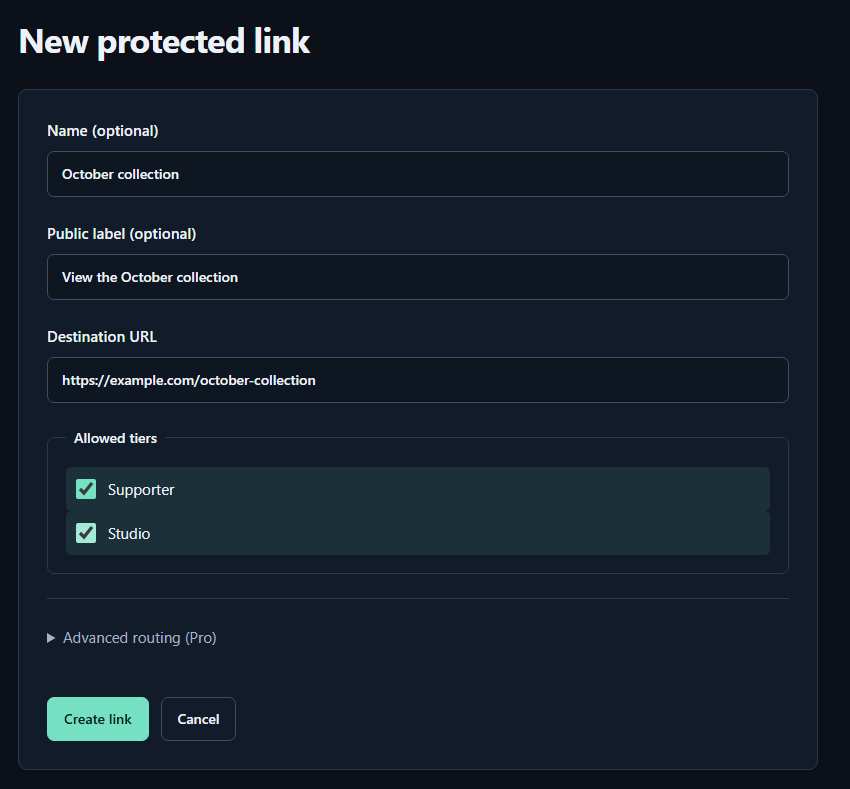
- Name (optional)A name for you. Fans cannot see it.
- Public label (optional)A name shown to fans. Both name fields may be left empty.
- Destination URLPaste the complete sharing URL for your work. The example.com address in the image is only an example.
- Allowed tiersTick every tier that may view the work. Select higher tiers yourself too.
- Create linkPress to save. You can leave the Pro routing settings closed for your first link.
What was observed after sharing
The operator saw many “Waiting for sign-in” entries in the access history. They also reported no complaints during the first 12 hours after publishing the link.
Neither observation proves that every member reached MEGA. An opening before sign-in does not establish who visited or whether they completed authentication. The absence of complaints is not a measured success rate.
How the access history was improved
The history now focuses on Redirect successful and Redirect failed. Visits before sign-in and checks before redirecting are excluded. Failure reasons and next steps appear inside Details, with the tiers recorded at access beside the member’s name.
Redirect successful means TierKey issued the redirect. It does not confirm that MEGA loaded or that a download finished. A failure can also come from a connection problem or a paused link; it does not by itself prove that someone is a non-member.
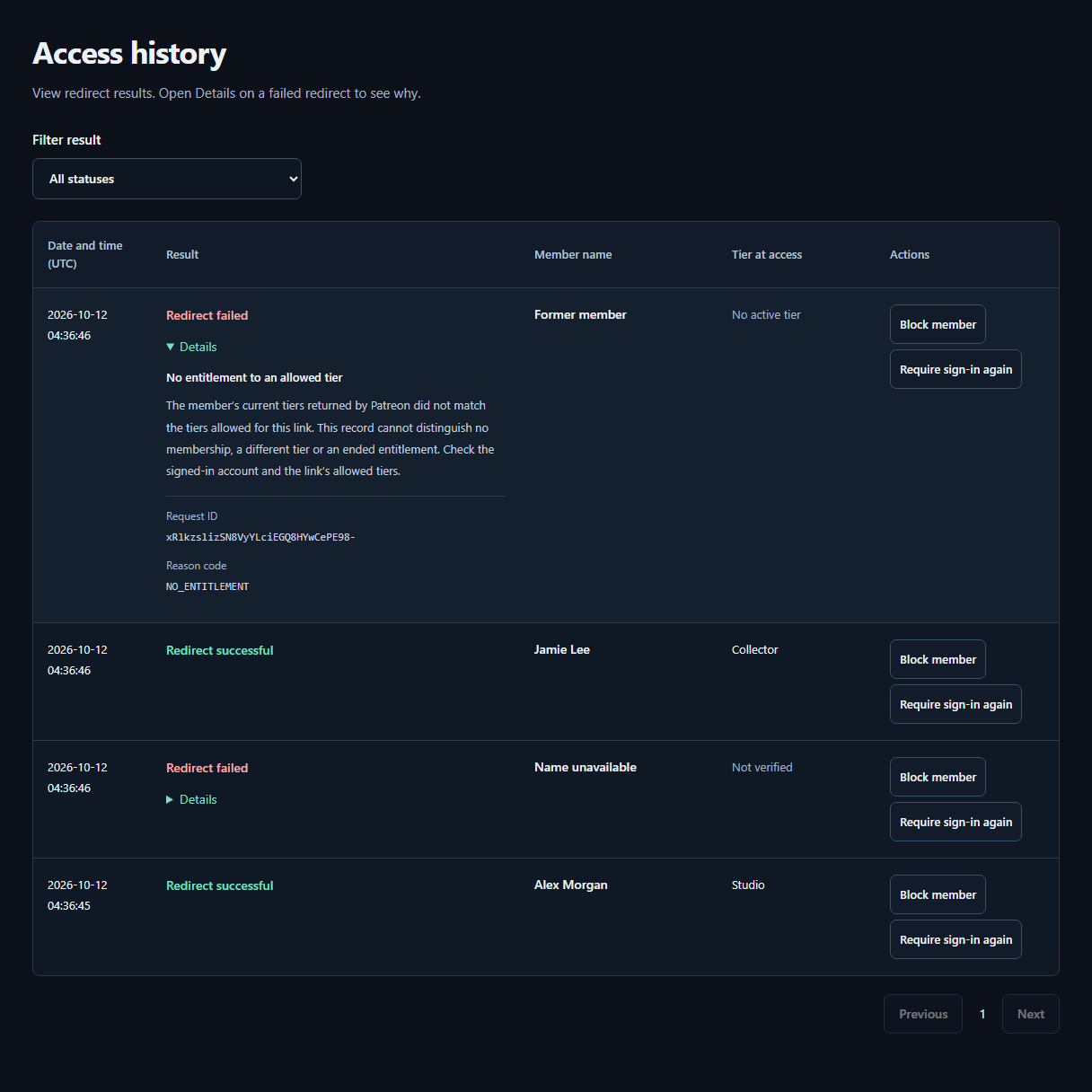
- ResultCheck whether the redirect succeeded or failed. The tier recorded at access appears beside the member’s Patreon display name.
- DetailsOpen Details on a failed row for the reason and next steps. A failure alone does not mean the visitor is not a member.
What this case does not establish
This case confirms the use of a TierKey entrance for a MEGA destination. It does not verify that older MEGA links were disabled. If an old destination URL is already exposed, revoke or replace it through the storage service and test the old route separately.
No reduction in piracy, revenue increase or independent customer success rate was measured for this case. An eligible member can still learn the destination URL and may save or share files.
Apply the workflow to your own Patreon
Follow the screenshot guide to join a plan with your creator account, connect Patreon, select allowed tiers and create your first link. Before publishing, ask a consenting eligible fan to test the complete route and check a non-eligible account too.
How to use TierKey: a screenshot guide