A locked Patreon post controls who can read that post. It does not automatically apply the same rule to a MEGA or Google Drive URL inside it. To respond to a leak, first identify whether someone shared the post, the destination link or a copy of the work. Each needs a different response.
Where the membership check stops
Picture a paid member opening your post and copying its download link into another message. If the storage service accepts anyone with that link, the next visitor can reach the file without opening Patreon at all. Changing the post’s audience does not change the storage service’s permissions.
A member may also download a file and upload a separate copy elsewhere. Protecting the original link cannot disable that copy. Finding a repost does not, by itself, identify which member shared it.
Identify what was exposed
Scroll the table sideways to see all columns.
| What you found | What it means | First action |
|---|---|---|
| A title or preview | It does not prove the full work is accessible. | Check what a signed-out visitor can actually open. |
| An external download URL | People who know the destination may bypass the post. | Review the destination’s sharing settings and revoke exposed access. |
| A separately uploaded file | The copy is independent of your original link. | Record its location and use the relevant site’s reporting process. |
Close the exposed route without losing legitimate members
- Record the affected post and destination privately. Do not repost a working download URL in a public warning.
- Use the storage service to revoke the old share or prepare a replacement destination. In Drive, review named users and inherited folder permissions as well as general access.
- Test the old URL in a signed-out session. Confirm the access you intended to remove is actually gone.
- Test the replacement with a legitimate member and update the member-only Patreon post. Explain which link to use next.
Put membership verification in front of future visits
With TierKey, store the replacement destination and choose the Patreon tiers allowed to use it. Share the TierKey link in your post. Visitors sign in to Patreon before TierKey checks their eligibility and redirects them.
A reposted TierKey link still leads through that check. A destination URL copied after a successful redirect remains a separate exposure: TierKey does not hide it from eligible members, revoke storage permissions or remove saved files.
These screenshots use the English interface. Match each number to its explanation. Select an image to enlarge it. Names, URLs and member records are examples.
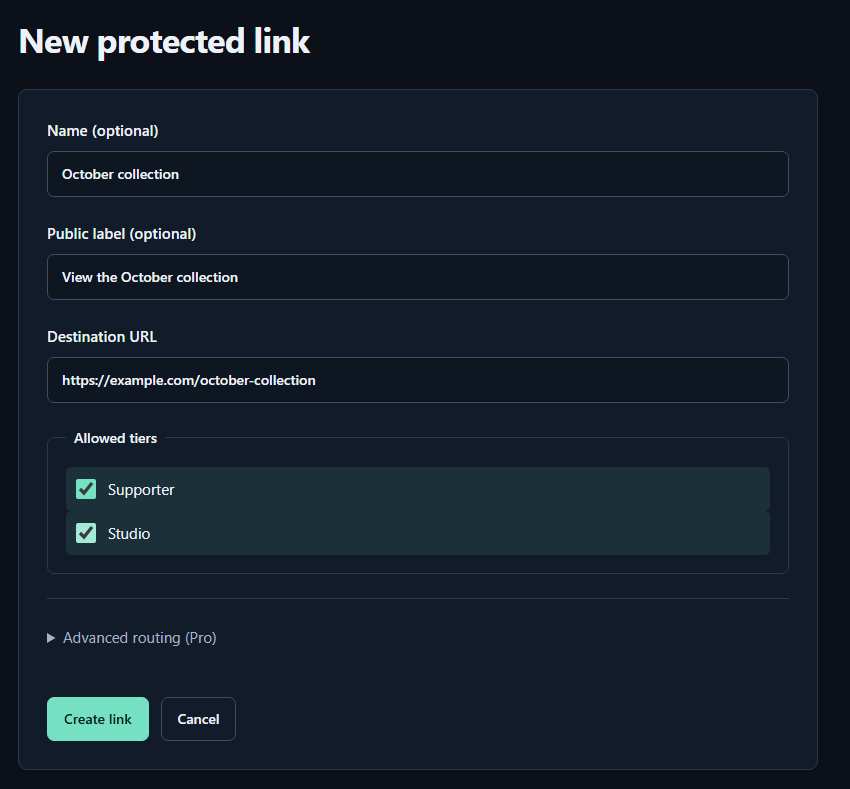
- Name (optional)A name for you. Fans cannot see it.
- Public label (optional)A name shown to fans. Both name fields may be left empty.
- Destination URLPaste the complete sharing URL for your work. The example.com address in the image is only an example.
- Allowed tiersTick every tier that may view the work. Select higher tiers yourself too.
- Create linkPress to save. You can leave the Pro routing settings closed for your first link.
Check the complete route before publishing
- Ask a consenting member in an allowed tier to test sign-in and opening the actual file; a configuration preview alone is not enough.
- Test an account outside the allowed tiers. If a transfer fails, read the history details instead of assuming the visitor is a pirate.
- If Patreon cannot be checked temporarily, treat that as a verification problem. A temporary error does not establish that someone is a non-member.