BasicPro
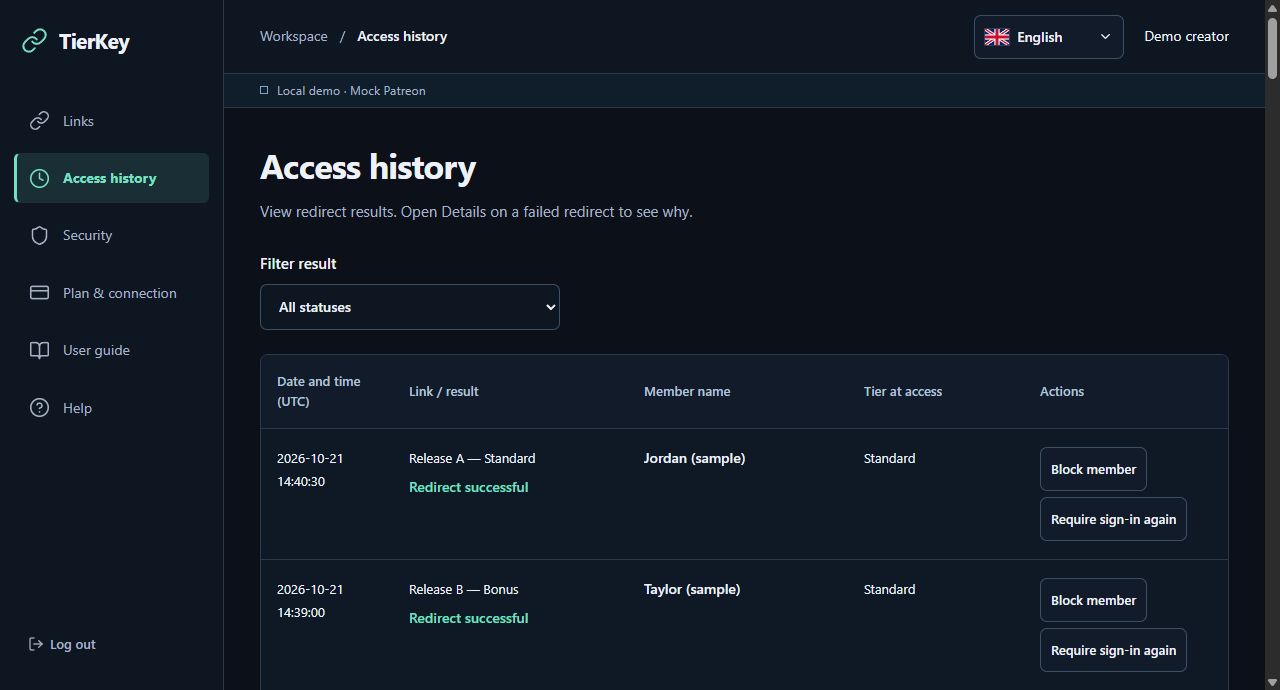
See which members used your links
Review the link name, time, redirect success or failure, member name and recorded tier when available. Expand failed entries for the reason. Basic keeps 7 days of history; Pro keeps 90 days.
TierKey is a link management service for Patreon creators. It checks a fan’s membership tier and redirects eligible fans to content on MEGA, Google Drive or another external service.
For first-time Basic members. Renews at $5/month after 7 days. Cancel during the trial.
The fan opens your TierKey link from a Patreon post or another location.
They sign in with their own Patreon account.
TierKey checks whether they have access to a tier allowed by the creator.
Eligible fans are redirected to the external content URL.
Fans without access to an allowed tier are not redirected.
Start with a paid TierKey membership, then connect your Patreon account and set up your content links.
Join Basic or Pro on TierKey’s Patreon page using the Patreon creator account you want to connect.
Log in as a creator and select your Patreon page. TierKey loads your membership tiers from Patreon.
In the dashboard, enter the destination URL, select the tiers that may access it and create your link.
Publish the generated TierKey link in a Patreon post or another location. You don’t need to post the destination URL itself.
Features
Control who reaches your distribution links, review access and respond to individual members. Basic covers link management and history; Pro adds member controls and tier-based routing.
Review the link name, time, redirect success or failure, member name and recorded tier when available. Expand failed entries for the reason. Basic keeps 7 days of history; Pro keeps 90 days.
Choose which paid tiers may use each link. Eligible fans continue to the destination after Patreon verification. Membership changes are reflected through updated Patreon information; checks are not guaranteed to be instantaneous.
Issue separate links for releases or files, add private management names and optional labels for fans, and search your link list. Copy the shared link and preview its configuration before publishing.
The link list shows access counts for the last 7 days. Separate links help compare activity for each release. These counts are not unique people or completed downloads.
Update a destination while keeping the same published TierKey link. Pause and resume a link when needed, or delete a link you no longer use. A known direct destination URL must be revoked at the storage service.
On Pro, switch between all results, successful redirects and failed redirects. Read failure details to distinguish an ineligible tier from an unfinished login or a temporary verification problem.
On Pro, stop a selected member from using your TierKey links. Review and remove blocks in Security. Add a private memo to record why you acted; it is not sent as a Patreon message.
On Pro, require a member to confirm their Patreon login on their next visit. Use it when you need their access checked again. This does not cancel or change their Patreon subscription.
Pro shows notices in the Security dashboard when recent access volume, countries or sessions reach the configured criteria. Review the evidence, close a notice or choose a member action. A notice is not proof of misuse.
On Pro, set a destination for each tier within one link. When multiple tiers match, your priority order selects the destination. Offer a standard release and an edition with extra rewards through the same entry link.
Use cases
Create ‘Release A’ and ‘Release B’ links pointing to separate files or folders. Compare their recent counts and check the named entries in access history. One link to a folder containing many files cannot identify which file a fan opened inside it.
When a file moves to another folder or service, edit the destination in TierKey. Existing Patreon posts keep working through the same TierKey link. If the old direct URL leaked, revoke or replace that storage share as well.
Check their history and any activity notice, then request a fresh sign-in or block future visits through your links when appropriate. Keep a private memo and remove the block if the issue is resolved.
Point one tier to the standard files and another to files with extra rewards. Share one TierKey link; Pro chooses the destination from the fan’s entitled tiers and your priority order.
These monthly subscriptions are for creators using TierKey. They are separate from the Patreon tiers your fans join. Fans do not need a TierKey subscription.
| Feature | Basic $5USD · per month | Pro $10USD · per month |
|---|---|---|
| Permanent links | Unlimited | Unlimited |
| Patreon tier verification | Included | Included |
| Change destinations and pause links | Included | Included |
| Access history retention | 7 days | 90 days |
| Access activity notices | Not included | Included |
| Block members | Not included | Included |
| Require sign-in again | Not included | Included |
| Destinations by tier | Not included | Included |
For first-time Basic members. Renews at $5/month after 7 days. Cancel during the trial.
No. Keep your files on MEGA, Google Drive or another external service. TierKey stores destination URLs; it does not store or deliver the files themselves.
No. TierKey controls access through the links it issues. It cannot block direct access to a known destination URL or prevent copying and redistribution of files a fan has already obtained.
Access continues while Patreon reports an active entitlement to an allowed tier. Cancelling renewal does not necessarily end access immediately. TierKey uses the membership information provided by Patreon.
For first-time Basic members. Renews at $5/month after 7 days. Cancel during the trial.