A leaked work does not automatically mean someone broke into your Patreon account. A member can copy a reward without taking over the creator account; an attacker who does take over that account can affect much more than a single download. Review the account and distribution problems separately so you protect the right entry points.
Identify which account or link needs attention
Scroll the table sideways to see all columns.
| Observation | First check | What it does not establish |
|---|---|---|
| A work was reposted | Which work and URL were exposed. | That the creator account was compromised. |
| A sign-in notice you did not trigger | Open Patreon directly and review the official account guidance. | Who caused it, based on a location label alone. |
| An unexpected change to your post or account | Check the actual account and contact official support if needed. | Which member, if any, was involved. |
| A failed TierKey redirect | Read that visit’s failure details. | An account takeover or an attacker’s identity. |
Protect the creator sign-in and its recovery email
- Use a unique password for Patreon and a different one for the email account used to recover it. Store them in a password manager rather than in shared project notes.
- Set up Patreon’s two-factor authentication through its official website. Keep recovery codes private and accessible if the usual device is lost; never include them in a support screenshot.
- If you sign in through Google, Apple or another provider, protect that account too. A password change in one service is not a promise that access in every connected service has been revoked.
- Use current browser and operating-system updates. Review extensions and third-party tools you no longer use, and check their official removal or access-revocation instructions.
Check an unexpected sign-in message without following its link
Use your own bookmark or type Patreon’s known address into the browser. Open the account there instead of following an urgent message claiming to fix a leak, payment or membership problem. Do not send passwords, one-time codes, recovery codes or browser session data to someone offering support.
If you did not initiate a device-verification request, do not approve it. Follow Patreon’s official guidance from the site you opened yourself. Keep the message time and relevant account changes for support, without forwarding secret codes. If you cannot access the account, use the official recovery and support route.
Review distribution after regaining control
- Check recent posts, preview text and download announcements for changes you did not intend. Check storage sharing separately; account recovery does not automatically undo a public file share.
- Replace a destination only when the situation requires it, then test the old and new access routes. Tell legitimate members where the current entry link is if their downloads were interrupted.
- Use TierKey history to review visits through your links. It does not show Patreon sign-in sessions or directly identify who changed a Patreon post. An absence of suspicious link visits does not prove the account was safe.
These screenshots use the English interface. Match each number to its explanation. Select an image to enlarge it. Names, URLs and member records are examples.
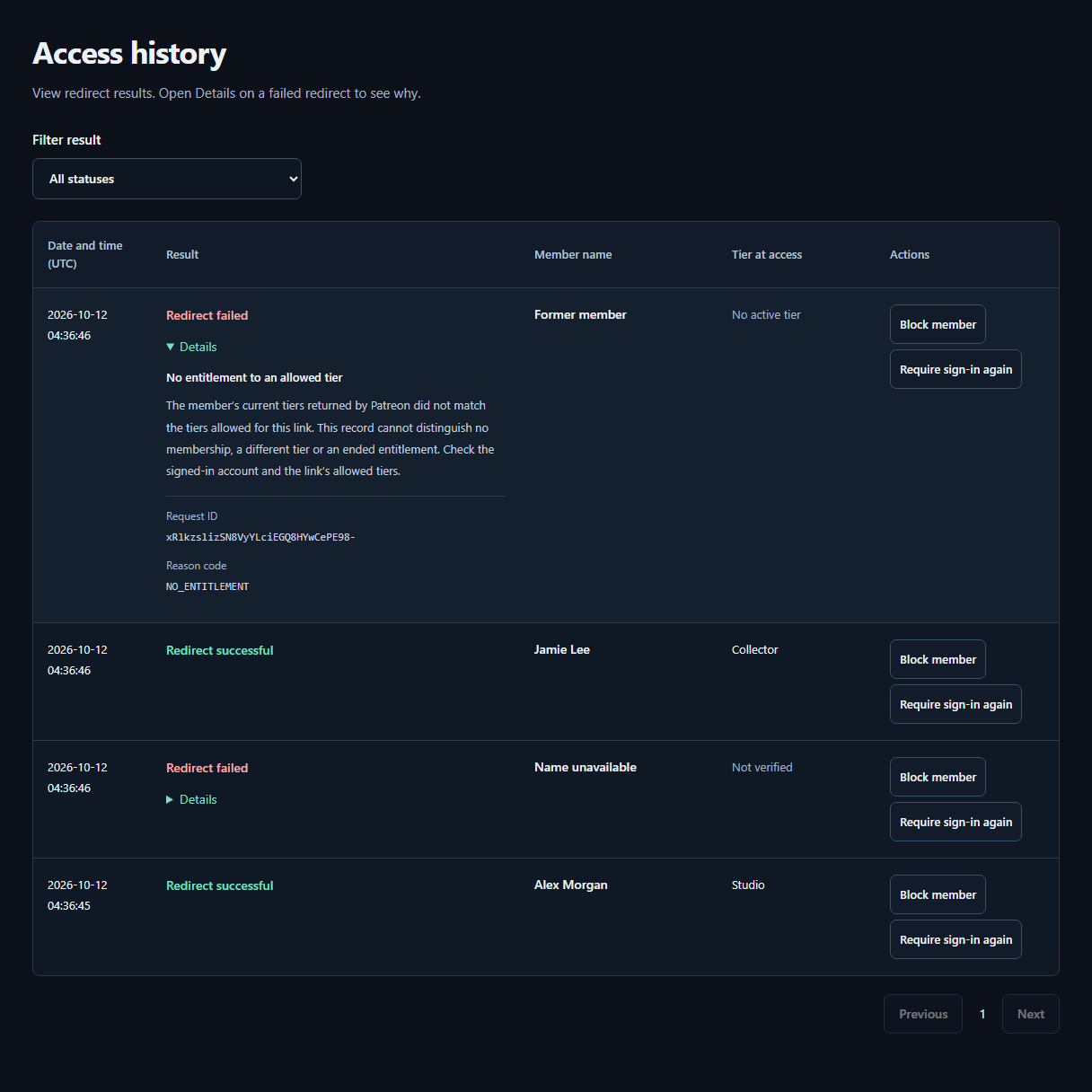
- ResultCheck whether the redirect succeeded or failed. The tier recorded at access appears beside the member’s Patreon display name.
- DetailsOpen Details on a failed row for the reason and next steps. A failure alone does not mean the visitor is not a member.
Give fans a sign-in instruction they can verify
Explain that a TierKey entry link leads to Patreon’s authorization flow. Fans should check the destination domain in their browser before entering credentials, and use the Patreon account that holds the relevant membership. Do not ask them to send you a password or authentication code to troubleshoot a download.
TierKey checks membership before redirecting; it is not a password manager, account-recovery service or guarantee against phishing. Its Pro re-login request applies to a fan’s next TierKey visit and is not a reset of the fan’s Patreon password or security settings.