A protected download entrance cannot remove a private layer, draft or credential that was accidentally included in the reward. Prepare the package itself before managing who can reach it. For PSD, Blender and ZIP rewards, make a clean release copy and test the exact file members will download.
Decide what the reward actually includes
Scroll the table sideways to see all columns.
| Deliverable | Check inside | Separate from the release |
|---|---|---|
| Layered PSD | Hidden layers, notes and unused alternatives. | Private drafts and material not promised to members. |
| Blender project | Linked or packed assets and file paths. | Unrelated projects and private reference material. |
| ZIP archive | Every included file and nested folder. | Backups, account details and unrelated documents. |
| Exported image or document | Visible content and embedded metadata. | Private contact details you did not intend to publish. |
Build the package in a separate release folder
- Write a short contents list for the promised reward. Decide whether members get an editable source or only a finished export; those are different deliverables.
- Create a new release folder and copy in only the intended files. Do not compress the whole working directory and then rely on its folder name to describe what is inside.
- Review the release copy’s layers, notes and metadata. Keep creator credits you want to publish, but remove unintended personal details from that copy. Preserve the working master separately.
- Give the release a clear name and version. Add a short readme describing the included files, required software and known dependencies without exposing your local account details.
Check what the editing application saves
Photoshop’s Save a Copy can preserve your original while creating a separate deliverable. A layered source can retain more information than a finished image. Export options also affect metadata, so inspect the actual chosen output rather than assuming every format contains the same information.
Blender projects may depend on external resources or contain packed data. Review the documentation for your installed version and list the dependencies needed by the recipient. Packing is not a privacy audit, and not every resource is necessarily included. Check which third-party assets you can share before adding them.
Test the archive as a recipient
- Create the final archive from the release folder. Extract it into another empty test folder, then inspect that extracted copy instead of the working project.
- Open the intended files and check for missing assets, unwanted content and links to private working locations. Keep your original folders untouched; use a separate test environment where practical.
- After uploading, download the published file yourself and repeat the check. Verify the archive contents, version and destination folder, not just that the upload completed.
A ZIP archive is a package, not a membership check. A renamed or compressed file can still contain the same private material.
Control access to the checked release
Put the checked package at the intended storage destination. Create a clearly named TierKey link and select the allowed Patreon tiers. Share that entry link in the relevant post, then ask an eligible member to test the actual download route.
TierKey does not inspect archives, remove metadata, sanitize project files or store the reward. Its history records redirects through the entry link, not which file inside an archive was used. If the package was wrong, replace it at the storage service and tell members which version to use; saved copies cannot be recalled by changing the link.
These screenshots use the English interface. Match each number to its explanation. Select an image to enlarge it. Names, URLs and member records are examples.
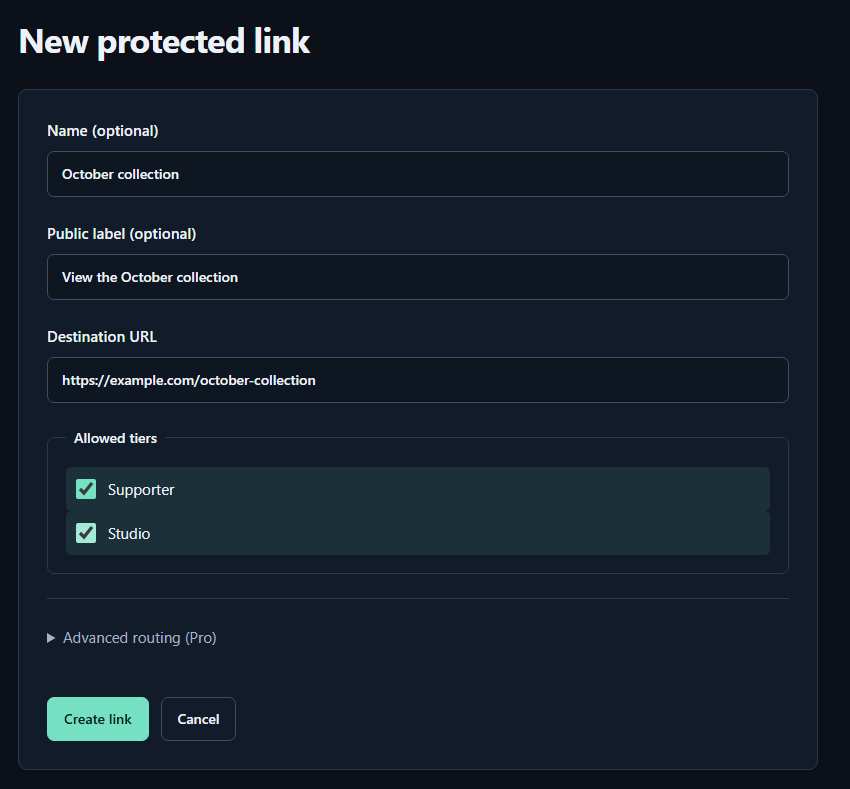
- Name (optional)A name for you. Fans cannot see it.
- Public label (optional)A name shown to fans. Both name fields may be left empty.
- Destination URLPaste the complete sharing URL for your work. The example.com address in the image is only an example.
- Allowed tiersTick every tier that may view the work. Select higher tiers yourself too.
- Create linkPress to save. You can leave the Pro routing settings closed for your first link.