A repeatable check is more useful than searching every piracy site whenever you feel worried. Choose a few public names and release titles, record what you actually find and decide in advance how you will respond. Search results and alerts provide leads, not a complete inventory of copies or proof that an account caused a leak.
Start with names and titles you already publish
- List your public creator name, previous handles and a few distinctive release titles. Avoid using private file URLs, member details or account credentials as search terms.
- Search combinations such as your creator name with Patreon, then a specific release title in quotation marks. Use the public spellings your audience uses, including another language if relevant.
- Separate your own pages and authorized mentions from suspected copies. A matching title alone may be a reference, review or impersonation rather than a copy of the work.
Know what each check can find
Scroll the table sideways to see all columns.
| Check | Useful for | Limit |
|---|---|---|
| Name and title search | Finding public pages mentioning your releases. | Unindexed or private pages may not appear. |
| Google Alerts | Receiving matching new Search results by email. | No alert is not evidence that no copies exist. |
| Image search | Finding visually related or matching public images. | Edited images or inaccessible pages may be missed. |
| A member’s report | Locating a specific suspected repost. | The report still needs verification. |
| TierKey history | Reviewing visits through your entry links. | It does not search the web or observe direct storage access. |
Use alerts for a small set of distinctive terms
Create Google Alerts for a few public names or titles and choose an email frequency you can manage. Review the early results and adjust noisy terms. Keep ordinary promotional mentions separate from possible copies so useful reports do not get buried.
If using Google’s image search, start with an already public preview rather than a private, full-resolution reward. Any image you upload goes to the search provider; consider that before choosing it. Do not include member names, personal details or private folder addresses.
Record enough to decide what to do next
- For a suspected copy, save the exact page URL, discovery date, release title and a screenshot showing the relevant content. Keep your notes private.
- Classify the finding as a copied file, exposed destination link, reused preview or unverified mention. Avoid downloading unfamiliar archives or signing in through an unfamiliar page just to confirm a suspicion.
- Mark whether you have checked it, reported it, revoked a share or confirmed removal. Repeated findings of the same page should update one record rather than inflate the number of incidents.
A search preview may be stale. Record what you could actually verify; ‘not found in search’ and ‘removed from the source’ are different outcomes.
Use access history to review your own distribution
Create separate, named TierKey links for releases when you need to distinguish their visits. The history screenshot below illustrates link-level redirect records. Successful redirection does not confirm that a file was downloaded, and failed redirection does not by itself identify a non-member.
TierKey does not monitor Pawchive, crawl piracy sites, send leak alerts or automatically identify uploaders. Pro access-attention notices concern activity through TierKey links. They are not notifications that a work appeared elsewhere.
These screenshots use the English interface. Match each number to its explanation. Select an image to enlarge it. Names, URLs and member records are examples.
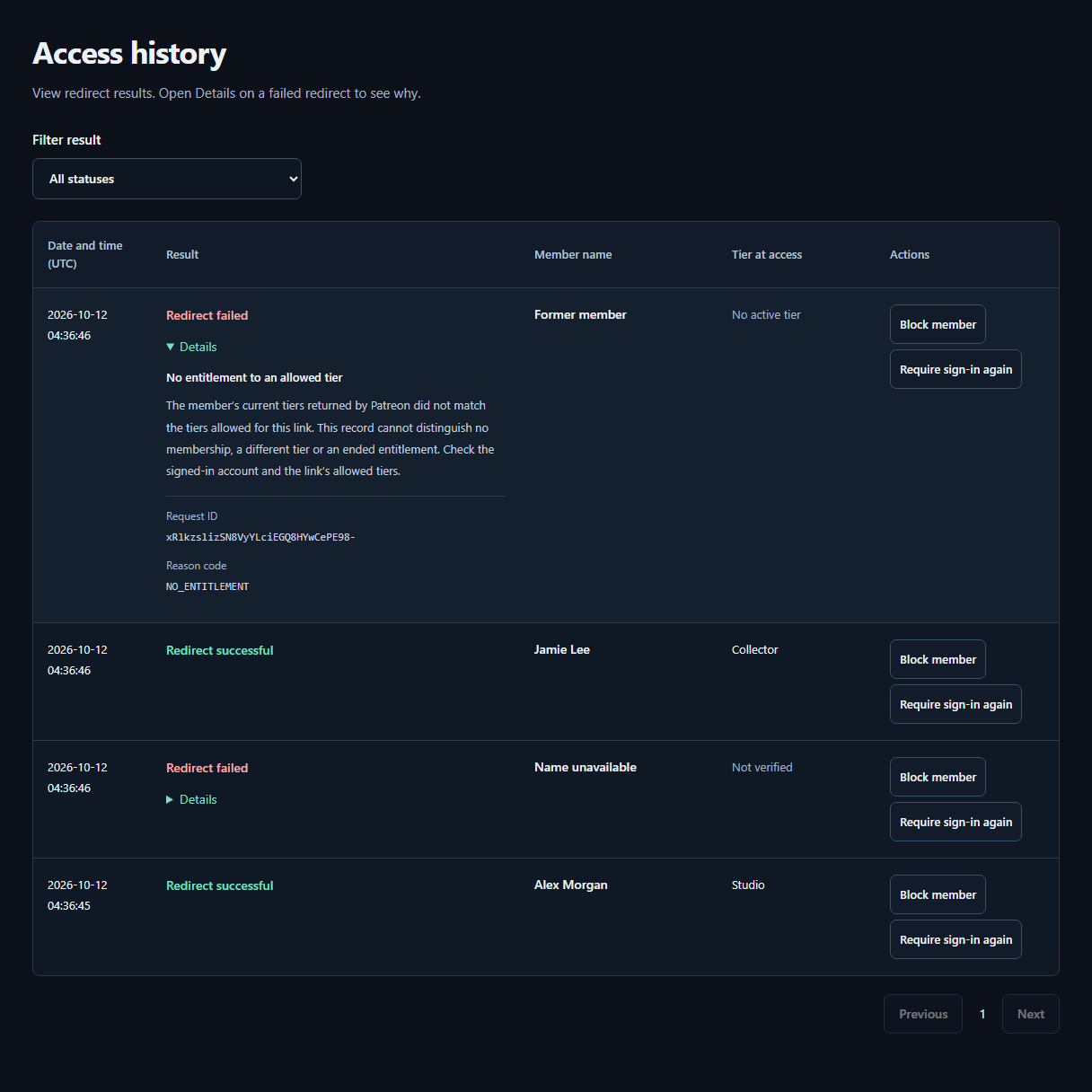
- ResultCheck whether the redirect succeeded or failed. The tier recorded at access appears beside the member’s Patreon display name.
- DetailsOpen Details on a failed row for the reason and next steps. A failure alone does not mean the visitor is not a member.
Keep the check manageable and act on verified findings
Start with a short weekly check and review alerts at a set time. Ask members who report a copy for its page address and the affected release, not passwords, verification codes or another member’s identity. Avoid asking them to buy access or download the suspected copy.
For a verified exposed storage link, revoke or replace that share and add membership checks to the new entry route. For an independently uploaded copy, use the relevant removal process. A quiet monitoring week does not guarantee there are no copies; it simply means your checks found no new verified case.