Keep your files on MEGA and use a TierKey link as the entrance you publish on Patreon. TierKey verifies the visitor’s Patreon membership and allowed tier before redirecting them to your MEGA destination. Fans do not need a TierKey subscription.
Prepare the MEGA destination
Use the complete HTTPS sharing link supplied by MEGA for the file or folder you intend to distribute. Keep any decryption key included after the # character. A link copied incompletely can pass the membership check but still fail at the destination.
Check that the destination opens as intended without your own MEGA owner session. MEGA passwords, decryption-key prompts and download restrictions remain separate from Patreon verification. TierKey does not decrypt, store or relay your files.
Replace a MEGA link that is already exposed
Putting an existing public MEGA URL behind TierKey does not invalidate copies of that URL. Use MEGA’s sharing controls to stop the old route and prepare a replacement, then test the old URL separately. Update TierKey’s destination after the replacement is ready; an existing TierKey link can stay the same.
Choose every Patreon tier that should have access
Allowed tiers come from the Patreon creator page connected to TierKey. Select each tier you intend to admit, including higher tiers when appropriate. TierKey does not grant access simply because a fan pays more. Pro can route different tiers to different destinations; Basic can use one destination with multiple allowed tiers.
Add the link and allowed tiers in TierKey
- Join TierKey Basic or Pro using the Patreon account that owns your creator page. Open Plan & connection → View Patreon plans to see the plans. If you have already joined, continue to the next step.
- Sign in to TierKey with that same Patreon account. To connect again, open Plan & connection, press Connect with Patreon, and allow the connection on Patreon.
- If you see Connect your Patreon campaign, select your own creator page under Campaign and press Connect campaign. Skip this step if your page is already connected.
Open Links in the menu and press New link. Fill in or select these four items from top to bottom.
- Name (optional)
- A name to help you find this link, such as “October collection”. Fans cannot see it. You may leave it empty.
- Public label (optional)
- A name shown to fans on the membership-check page, such as “View the October collection”. You may leave it empty.
- Destination URL
- Use “Copy sharing link” or a similar option on the service hosting your work, then paste that address here. It must start with https://. Keep the whole address, including any part after # in a MEGA link.
- Allowed tiers
- Tick the box next to each membership tier that may view the work. Choose at least one. To include higher tiers, tick those too. A higher price alone does not grant access automatically.
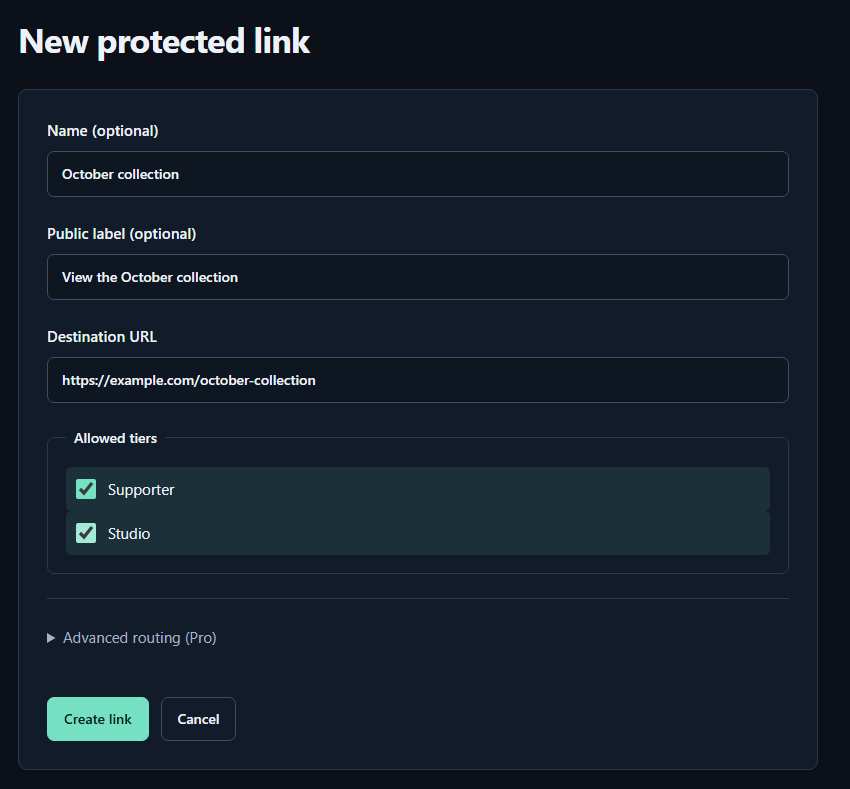
- Name (optional)A name for you. Fans cannot see it.
- Public label (optional)A name shown to fans. Both name fields may be left empty.
- Destination URLPaste the complete sharing URL for your work. The example.com address in the image is only an example.
- Allowed tiersTick every tier that may view the work. Select higher tiers yourself too.
- Create linkPress to save. You can leave the Pro routing settings closed for your first link.
For your first link, you can leave Advanced routing (Pro) closed and press Create link. When you see Link saved. and the link appears in the list, it is ready.
How to use TierKey: a screenshot guideTest before publishing
Preview checks your configuration; it does not prove that a fan can sign in. Ask a consenting fan with an allowed tier to test the whole flow. Also test a non-member or an account without an allowed tier. A temporary Patreon error is not proof that someone is a non-member. Check the failure details in access history.
What TierKey can and cannot protect
TierKey checks membership before redirecting a visitor. It does not host files or change the destination service’s permissions. An eligible fan can see the destination URL and may copy files. A destination URL that has already leaked must be disabled or replaced at the storage service. TierKey cannot recall saved copies.