Putting an unlisted YouTube video in a paid Patreon post restricts who can read that post, but does not turn the video into a Patreon-member-only player. Check the video’s own visibility and the route members use to watch it. A membership-check entry link and a video-host permission solve different parts of this journey.
Separate discovery from permission to watch
Scroll the table sideways to see all columns.
| Route | Who can enter | What to remember |
|---|---|---|
| Public YouTube video | The public, subject to YouTube’s other restrictions. | A paid Patreon announcement does not change its visibility. |
| Unlisted YouTube video | Anyone who has the video link. | The link can be passed on outside Patreon. |
| Private YouTube video | Accounts invited by the video owner. | A Patreon membership does not create that invitation. |
| TierKey entry link | Patreon members in the allowed tiers, after verification. | It checks entry, not later playback on YouTube. |
Choose visibility before posting the video
- In YouTube Studio, review the video’s Visibility setting. Decide whether link-based access is acceptable or whether you need invitations to specific accounts.
- If using private video invitations, explain which Google account the member must use. Plan how to manage invitations separately from Patreon tier changes.
- Check the video description, playlists and other announcements for direct links or information you did not intend to publish. Test the viewer’s route rather than only the creator’s signed-in preview.
Use TierKey when a browser entry check fits your delivery
For a browser-based route, register the intended watch-page URL in TierKey and select the allowed Patreon tiers. Share the TierKey link as the entry point. This does not replace an embedded player or automatically authorize a Google account to watch a private video.
An eligible viewer can still learn an unlisted destination after redirection and share it. If the same video URL already escaped, adding TierKey does not stop direct viewing. Choose the hosting permissions according to that remaining exposure instead of promising that the entry link hides the video permanently.
These screenshots use the English interface. Match each number to its explanation. Select an image to enlarge it. Names, URLs and member records are examples.
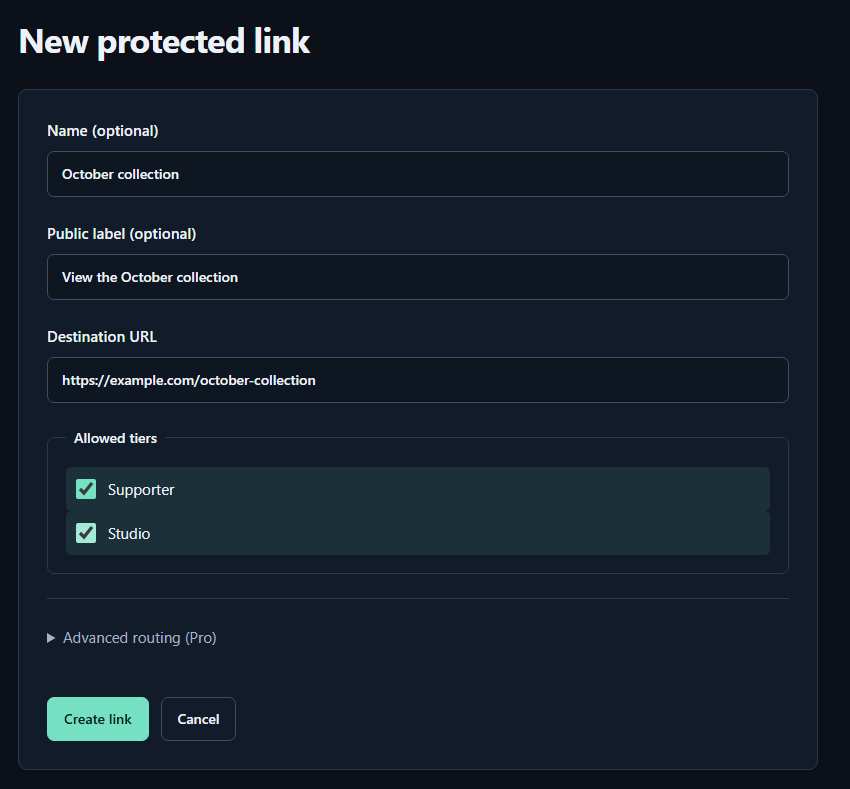
- Name (optional)A name for you. Fans cannot see it.
- Public label (optional)A name shown to fans. Both name fields may be left empty.
- Destination URLPaste the complete sharing URL for your work. The example.com address in the image is only an example.
- Allowed tiersTick every tier that may view the work. Select higher tiers yourself too.
- Create linkPress to save. You can leave the Pro routing settings closed for your first link.
Test the post, entry link and player separately
- Ask a consenting eligible member to open the Patreon post, complete any entry check and start playback. Confirm the intended video opens with the expected YouTube account.
- Test a non-member account against the TierKey entry. A temporary verification error is not proof of non-membership. Then separately test the video’s direct URL in a signed-out browser to see what the host allows.
- When a redirect succeeds but playback fails, inspect YouTube visibility, invitations and account selection. Changing Patreon tiers cannot repair a missing private-video invitation.
Respond at the video host if its direct link leaked
Keep the affected URL and discovery time privately, then review the host’s visibility controls. Making an unlisted video private changes the legitimate viewing route too, so prepare and test any required invitations before announcing the change. Removing the Patreon embed alone does not revoke the YouTube URL.
TierKey does not host or proxy video, add DRM, prevent screen recording or record watch completion. Its access history concerns redirects through TierKey, not play time or direct YouTube visits. A copied recording needs a separate removal response.