When a paid Patreon release appears on another site, deal with both the copy already published and any download link that still opens your files. A removal request addresses a particular publication. Revoking an exposed share closes an existing route to your storage. Prepare both actions rather than waiting for one to solve the other.
Keep a small record before changing links
- Save the exact page address, discovery date and a screenshot showing the relevant work. Record the original release title and publication date separately.
- Identify whether the page contains a copied file, an external download link or only a reference to your work. Record each affected URL separately; a site’s homepage usually does not identify the specific material.
- Keep originals and working files privately. For an initial report, use only the material the recipient needs; do not publish a members-only archive as evidence.
Choose the reporting channel for the location of the copy
Patreon’s reporting process concerns infringement on Patreon. A copy on Pawchive or another external site requires the relevant external reporting channel. Check the current official instructions before sending a report.
Scroll the table sideways to see all columns.
| Where the material appears | Where to start | What the action concerns |
|---|---|---|
| A post on Patreon | Patreon’s copyright reporting process | The allegedly infringing material on Patreon. |
| A third-party page or storage service | That service’s official copyright or abuse channel | Material it hosts or controls; requirements vary by service. |
| A Google Search result | Google’s legal removal process | Its search result; the source copy can remain online. |
| Your own exposed sharing link | Your storage service’s sharing controls | Access through that share, not independently uploaded copies. |
Prepare a report you can verify
Follow the chosen service’s form and explain which work is yours, where the original was published and which specific URLs you are reporting. Check authorization and ownership before making a copyright claim; permitted use and applicable rules depend on the circumstances.
Copyright notices may disclose personal details. Review the recipient’s disclosure policy first, and consider a qualified representative if you need help with identity protection or a disputed claim. This is a workflow guide, not a legal determination or a ready-to-sign notice.
Close the exposed route to your storage
- Use the storage service to revoke the exposed share or change its permissions. Editing the Patreon post or adding TierKey does not invalidate a direct storage URL already known to someone.
- If a replacement destination is needed, prepare it and review its sharing settings. Check for individual or inherited permissions as well as general link access.
- Test the old share in a signed-out browser. Check the intended new route with an eligible member, then update download announcements and tell members where to find the replacement.
Revoking a link does not delete files someone already downloaded or re-uploaded elsewhere.
These screenshots use the English interface. Match each number to its explanation. Select an image to enlarge it. Names, URLs and member records are examples.
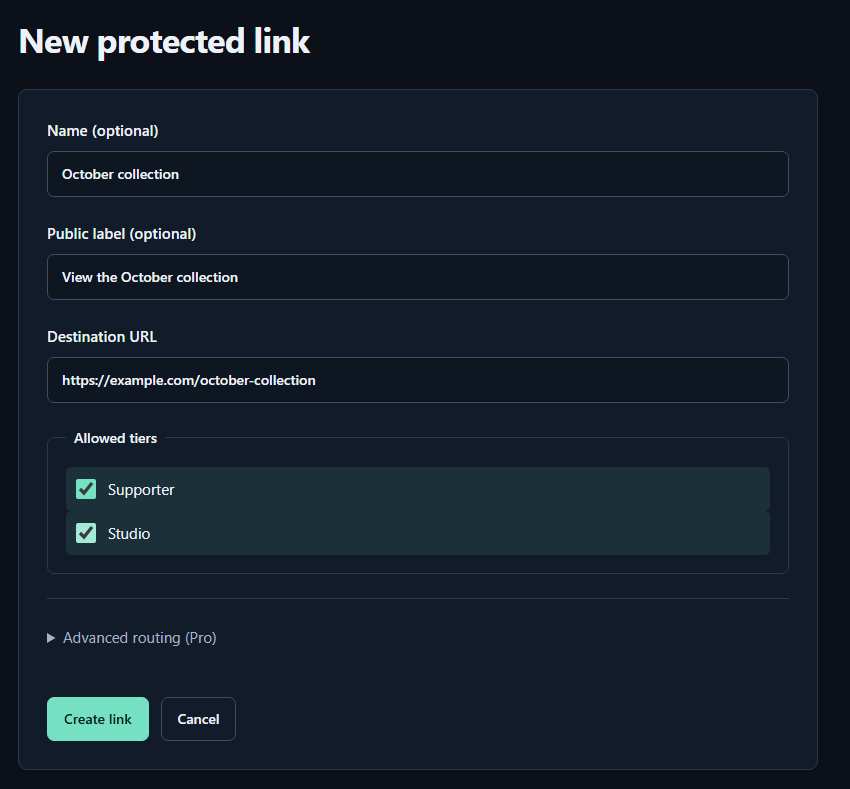
- Name (optional)A name for you. Fans cannot see it.
- Public label (optional)A name shown to fans. Both name fields may be left empty.
- Destination URLPaste the complete sharing URL for your work. The example.com address in the image is only an example.
- Allowed tiersTick every tier that may view the work. Select higher tiers yourself too.
- Create linkPress to save. You can leave the Pro routing settings closed for your first link.
Add a membership check to future entry links
Register the new destination in TierKey, select the allowed Patreon tiers and publish the TierKey link instead of the raw destination. Future visits through that link require membership verification. A copied TierKey link still passes through the same check.
TierKey does not submit takedown notices, remove pirate-site posts or change storage permissions. Authorized members can still learn the destination and save files. Keep removal records and storage controls alongside the membership check.
Check the outcome of each action separately
Track the reported URL, report date, confirmation number and response in a private list. Recheck the actual page and old share after a change. A successful search-removal request does not establish that the source copy was deleted, and a submission receipt does not establish removal.
Give legitimate members a short status update if downloads were interrupted. Share the replacement entry link without republishing the exposed destination or another person’s details.