A member’s private podcast RSS link is an access-bearing subscription address, not a general promotional link. Keep it separate from the show’s public feed and from links to bonus files. That distinction helps you respond to sharing without breaking ordinary listening in a podcast app.
Keep four kinds of audio access separate
Scroll the table sideways to see all columns.
| Item | Intended use | Handling |
|---|---|---|
| Public show feed | Distributing public episodes. | Share only the public address for promotion. |
| A member’s private RSS link | Subscribing to that member’s eligible episodes. | Do not post it as the feed for everyone. |
| Browser link to bonus files | Opening a download page after an entry check. | Use separately from the podcast subscription URL. |
| A downloaded episode | Offline listening to a saved copy. | Changing a link cannot recall that copy. |
Review the show’s distribution before inviting listeners
- In Patreon’s podcast settings, distinguish the public distribution from members-only RSS. Check episode audience settings as well as the show-level options.
- Ask a consenting eligible member to check the episodes available in their own feed. Do not use one member’s personal URL as a sample in a public guide or screenshot.
- Review the show title, artwork and author contact information that will travel with the feed. Use a contact address you intend to share with listeners.
- Write separate instructions for public listening, member listening and bonus downloads. Name the route clearly so fans do not paste a web sign-in page into a podcast app.
Troubleshoot playback without exchanging other members’ links
If a listener’s app stops updating, confirm their current access and whether the problem affects one episode or the whole feed. Direct them to their own latest RSS link and Patreon’s member instructions. An app error alone does not prove sharing or non-membership.
Podcast apps can cache episodes. When access ends, a stopped feed update is different from deleting media already saved on a device. Avoid asking the listener for a password, authentication code or another member’s feed as a workaround.
Use TierKey for a separate browser download, not the RSS feed
If the podcast also offers transcripts, artwork or bonus ZIP files in external storage, create a named TierKey link to that download destination and select its allowed tiers. Label it ‘Bonus downloads’ separately from ‘Listen in a podcast app’.
TierKey is not an RSS server or podcast authorization service. It does not issue or reset Patreon feeds, inspect listening apps or count episode plays. Its browser login flow is unsuitable as a substitute for the private RSS subscription address. History for a bonus link records redirects, not audio listening or completed downloads.
These screenshots use the English interface. Match each number to its explanation. Select an image to enlarge it. Names, URLs and member records are examples.
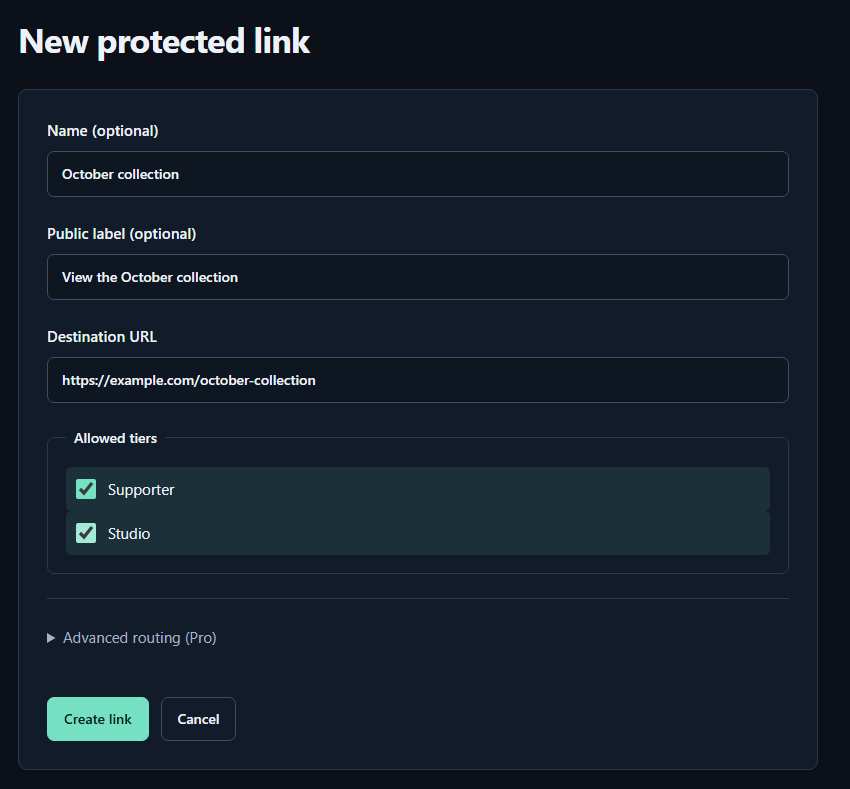
- Name (optional)A name for you. Fans cannot see it.
- Public label (optional)A name shown to fans. Both name fields may be left empty.
- Destination URLPaste the complete sharing URL for your work. The example.com address in the image is only an example.
- Allowed tiersTick every tier that may view the work. Select higher tiers yourself too.
- Create linkPress to save. You can leave the Pro routing settings closed for your first link.