A single archive folder is convenient until each month has different access rules. Decide whether membership includes the whole library, only the current release, or the releases a fan previously purchased. Those promises require different delivery arrangements; a folder labelled with a month does not enforce them.
Define which releases the membership includes
Scroll the table sideways to see all columns.
| Member promise | Organize files by | Can a current-membership check decide access? |
|---|---|---|
| All archive files while eligible | Library or tier | Yes, for future redirects to allowed tiers. |
| Only the currently available release | Separate release destinations | Only if the destination contains just the intended release. |
| Keep the months previously purchased | Purchase-specific entitlement | No. Current tier alone does not establish purchase history. |
Separate destinations before sharing links
- Write down each release, eligible tiers and availability period. For example: October files for current members; previous releases sold separately. This is a planning example, not an automatic TierKey rule.
- Create destinations containing only the files that audience should receive. A current-month link should not reveal a parent folder holding the entire archive.
- Give each release a clear name, such as ‘October 2026’. Keep a private list matching the name, destination and published TierKey link.
- Check folder and file permissions independently. Naming, moving or hiding a file in a listing is not a substitute for verifying access.
Use TierKey for current membership and allowed tiers
Create a TierKey link for each destination and select its allowed Patreon tiers. Use a release-specific link when old posts need to keep their original meaning. Share that link in the corresponding Patreon post, with a description of who may open it.
TierKey does not offer rules such as ‘paid for October’, a join-date cutoff, or an automatic monthly release calendar. Pro tier-based routing changes destinations by tier, not by the months a fan purchased. Use a purchase-aware delivery method where those conditions are required.
These screenshots use the English interface. Match each number to its explanation. Select an image to enlarge it. Names, URLs and member records are examples.
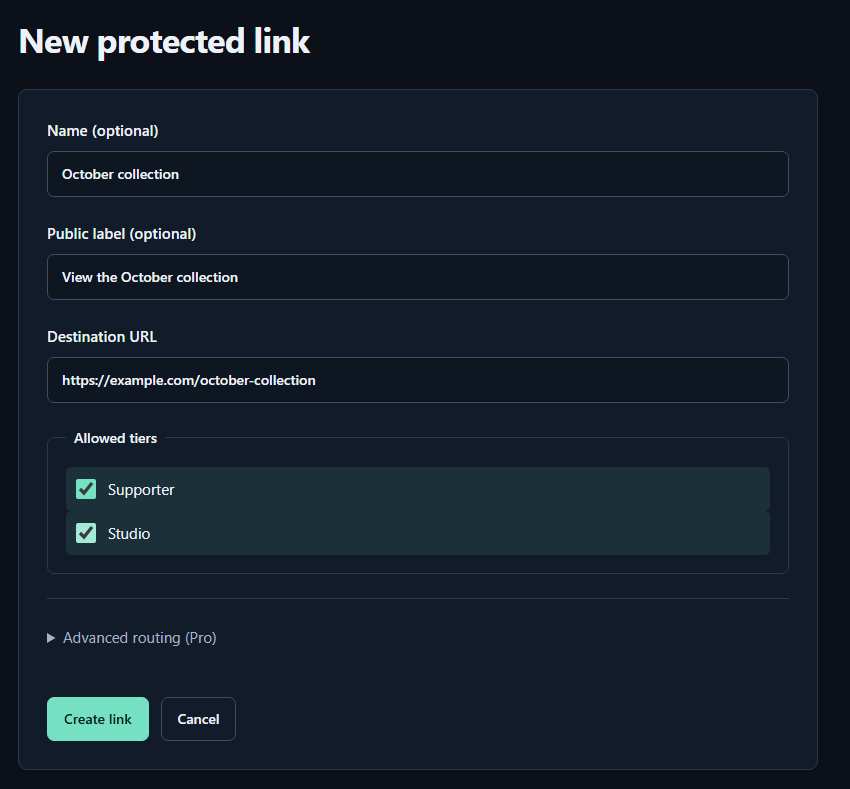
- Name (optional)A name for you. Fans cannot see it.
- Public label (optional)A name shown to fans. Both name fields may be left empty.
- Destination URLPaste the complete sharing URL for your work. The example.com address in the image is only an example.
- Allowed tiersTick every tier that may view the work. Select higher tiers yourself too.
- Create linkPress to save. You can leave the Pro routing settings closed for your first link.
Prepare the next month without breaking your promise
- Prepare and test the new destination before announcing it. Keep the outgoing release available for the period you already promised.
- Publish a new clearly named link, or explicitly explain a link that always opens the latest release. Repointing an old link can also change where old bookmarks lead.
- Update the member instructions and check an older post. If previous purchases should remain available, preserve a suitable purchase-based route instead of relying only on current membership.
Test the boundaries of the archive
With a consenting eligible fan, open the shared link and confirm the intended files are available. Then inspect the destination’s navigation: can that fan also reach adjacent months or a parent archive? Test an account outside the allowed tiers separately.
If an old destination URL leaked, disabling a TierKey link does not revoke that direct URL. Change or revoke the share at the storage service, and update the appropriate release link. Files already saved remain outside this control.